Accounting, Tax, Payroll, HRIS Software and Outsourcing
Accounting Software for Philippine Businesses
Manage your accounting, financial reporting, and BIR tax compliance in one integrated system. MPM Accounting Pro gives growing businesses the tools to automate accounting processes, maintain financial records, and stay on top of tax requirements.
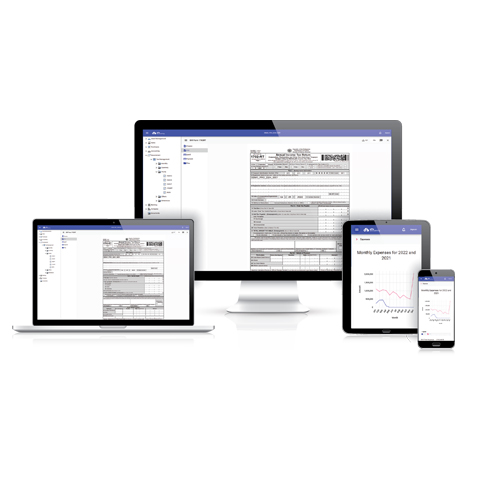
MPM Accounting Pro Subscription Plans
More Than Just Tax Filing Software
From day-to-day accounting to tax compliance and advanced financial management, MPM Accounting Pro brings your essential accounting processes together in one system.
Accounting
Manage sales, purchases, collections, payments, and accounting records.
Tax Compliance
Prepare and file BIR forms, tax reports, and required attachments from your records.
Financial Reporting
Generate financial statements and reports from up-to-date accounting data.
Accounts Receivable & Payable
Manage customer receivables, supplier payables, collections, and payments.
Voucher System
Manage disbursements, revolving funds, petty cash, and related accounting entries.
Fixed Assets
Track fixed assets and automate depreciation and accounting entries.

Payroll Integration
Connect with MPM Payroll and automatically record payroll transactions.
Project Accounting
Track project income, costs, and profitability separately.
Try it for 30 days
100% risk free with no credit card required and you can cancel anytime.
Create account for free!Keep Your Accounting Records Up to Date
Record your sales, purchases, receipts, payments, and other business transactions in one system. MPM Accounting Pro automatically creates the corresponding accounting entries and updates your books and ledgers as transactions are recorded.
Instead of maintaining separate records for bookkeeping, financial reporting, and tax preparation, your accounting data becomes the foundation for the rest of the system.
Record Transaction
Accounting Entry
Books & Ledgers
Tax Records
Financial Reports
Accounts Receivable & Payable
Keep track of outstanding customer invoices and supplier obligations without maintaining separate spreadsheets.
MPM Accounting Pro connects invoices, collections, bills, and payments to your accounting records, giving you a clearer view of your receivables and payables while automatically updating the appropriate accounts.
Record Sales / Purchase Invoice
Record Collection / Payment
Update & Reconcile AR/AP
Aging & Outstanding Balances
Voucher System
MPM Accounting Pro includes a voucher system for businesses that need a more organized and controlled process for handling payments and cash disbursements.
Manage payment vouchers, revolving funds, petty cash, fund custodians, liquidations, and replenishments while keeping the corresponding transactions connected to your accounting records.
Custodian Receives Petty Cash / Revolving Fund
Cash Disbursement
Liquidation
Replenishment
Track Assets and Automate Depreciation
Maintain a complete record of company fixed assets and let MPM Accounting Pro handle recurring depreciation calculations and accounting entries.
Record asset acquisitions, useful lives, depreciation settings, and other asset information in one place. The system can then calculate depreciation and update the appropriate accounting records.
Record Asset Purchase
Track & Monitor Asset
Automatically Record Depreciation
Asset Disposal / End of Life
Turn Your Accounting Records Into BIR Tax Returns
Tax filing is an important part of MPM Accounting Pro—but it is only one part of the system.
Because your transactions are already recorded in MPM Accounting, the system can use the same accounting data to prepare applicable BIR forms, schedules, alphalists, and other tax compliance requirements.
This reduces duplicate encoding and helps keep your tax returns consistent with your accounting records.
Record Transaction
Accounting Entry
Book & Ledgers
Create Tax Form
Create Required Attachments
File & Submit to BIR
Receive & Save Proof of Filing and Submission
Financial Statements Generated From Your Actual Records
Your financial reports should be the result of your accounting—not another set of spreadsheets that needs to be prepared separately.
MPM Accounting Pro generates financial statements and accounting reports directly from the transactions recorded in the system, allowing you to review your company’s financial position using up-to-date accounting data.
- Income Statement
- Balance Sheet
- Trial Balance
- General Ledger
- Accounts Receivable reports
- Accounts Payable reports
- Other accounting and management reports
As transactions are recorded, your reports are updated accordingly, giving management and accountants better visibility into the business throughout the year—not only when tax returns or annual financial statements are due.
Payroll Integration
If you also use MPM Payroll, payroll and accounting can work together instead of operating as two completely separate systems.
Payroll information can be transferred to MPM Accounting, reducing the need to manually recreate payroll-related accounting entries and helping keep payroll expenses and liabilities consistent with your payroll records.
This creates a more connected workflow between HR, payroll, accounting, and tax compliance.

Project Accounting
For businesses that operate by project, company-wide financial statements don’t always provide enough information.
Project Accounting allows you to track income and expenses by project so you can see how individual projects contribute to the overall performance of your business.
When used together with MPM Payroll, payroll costs can also be associated with projects, giving you a more complete picture of actual project costs.
- Track income by project
- Track expenses by project
- Allocate transactions to projects
- Monitor project costs
- Integrate applicable payroll costs
- Generate project-level financial reports
- Analyze project profitability
Ready to Do More With Your Accounting Software?
See how MPM Accounting Pro can simplify your accounting, financial management, and tax compliance—all in one system.
Start your free 30 day trial today!Frequently Asked Questions
What is MPM Accounting Pro?
What is the difference between MPM Accounting Lite, Basic, and Pro?
Who should use MPM Accounting Pro?
Can MPM Accounting Pro prepare and file BIR tax returns?
Can MPM Accounting Pro manage petty cash and revolving funds?
Can MPM Accounting Pro integrate with MPM Payroll?
Does MPM Accounting Pro support project accounting?
Is MPM Accounting Pro cloud-based?
How many users can access MPM Accounting Pro?
Can I restrict which features a particular user can access?
Try it for 30 days
100% risk free with no credit card required and you can cancel anytime.
Create account for free!