If you’ve filed a tax return through eBIRForms but haven’t received the Tax Return Receipt Confirmation (TRRC) email, you’re not alone.
This has become a common concern among taxpayers and accounting professionals, especially during peak filing periods. While the missing email can be worrying, it doesn’t necessarily mean your return wasn’t successfully submitted.
What is the TRRC?
The Tax Return Receipt Confirmation (TRRC) is the system-generated email sent by the Bureau of Internal Revenue (BIR) confirming that your electronically filed tax return has been successfully received.
Many taxpayers keep this email as part of their tax filing records since it serves as proof of electronic filing.
What if You Don’t Receive the TRRC?
There are several possible reasons why the confirmation email may not arrive promptly:
- Temporary delays in the BIR email system
- The email was filtered into your Spam or Junk folder
- Your mailbox is full or inaccessible
- Your company’s email security or firewall blocked the message
Because of these situations, the BIR has already provided guidance for taxpayers who experience delayed or non-receipt of the TRRC.
BIR Allows a Screenshot as Proof of Filing
Under Revenue Memorandum Circular (RMC) No. 20-2026, taxpayers filing through the Offline eBIRForms Package are instructed to capture a screenshot of the “Submit Successful” pop-up message indicating that a system-generated confirmation email has been sent to their registered email address.
More importantly, RMC No. 20-2026 expressly provides that this screenshot serves as proof of filing and successful submission of the tax return, particularly when there is a delay in receiving the official email confirmation.
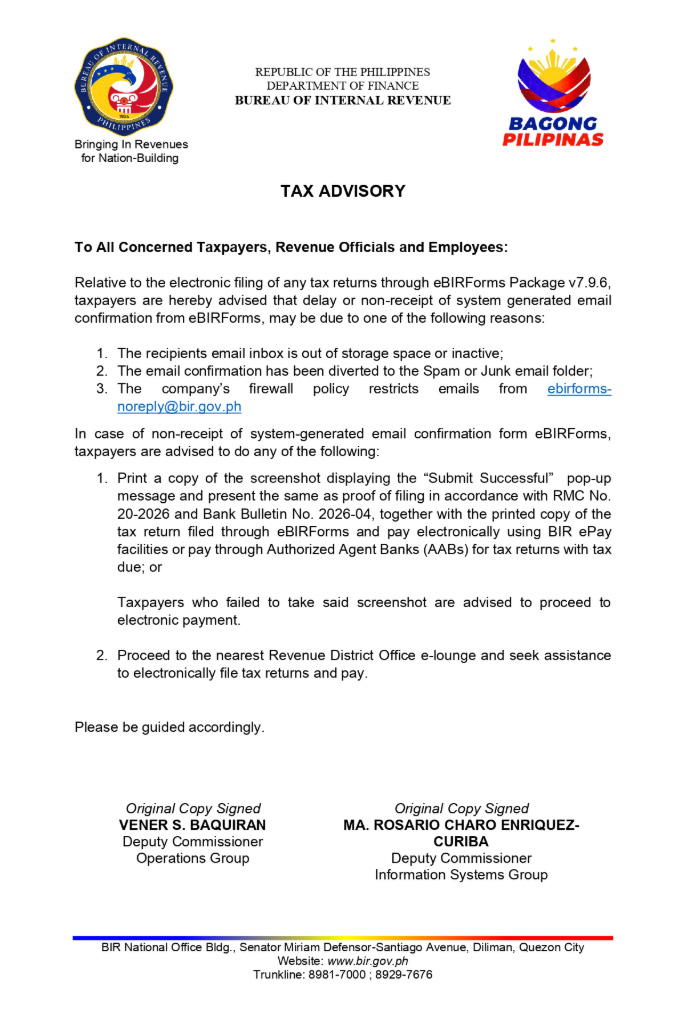
The BIR later reinforced this guidance in its May 8, 2026 Tax Advisory addressing the delayed or non-receipt of eBIRForms confirmation emails. The advisory reminded taxpayers to print or keep a copy of the “Submit Successful” screenshot as proof of filing, in accordance with RMC No. 20-2026 and Bank Bulletin No. 2026-04.
This means that if the eBIRForms submission was successful but the Tax Return Receipt Confirmation (TRRC) email has not yet arrived, the “Submit Successful” screenshot should be retained as evidence that the return was successfully filed.
Important: RMC No. 20-2026 was issued in connection with the filing of 2025 Annual Income Tax Returns. However, the subsequent May 8, 2026 BIR Tax Advisory specifically addressed delayed or missing eBIRForms confirmation emails and reiterated the use of the “Submit Successful” screenshot as proof of filing.
Best Practice: Capture the Entire Screen
While RMC No. 20-2026 specifically refers to taking a screenshot of the “Submit Successful” pop-up, it is a good practice to capture the entire screen, including the computer’s date and time.
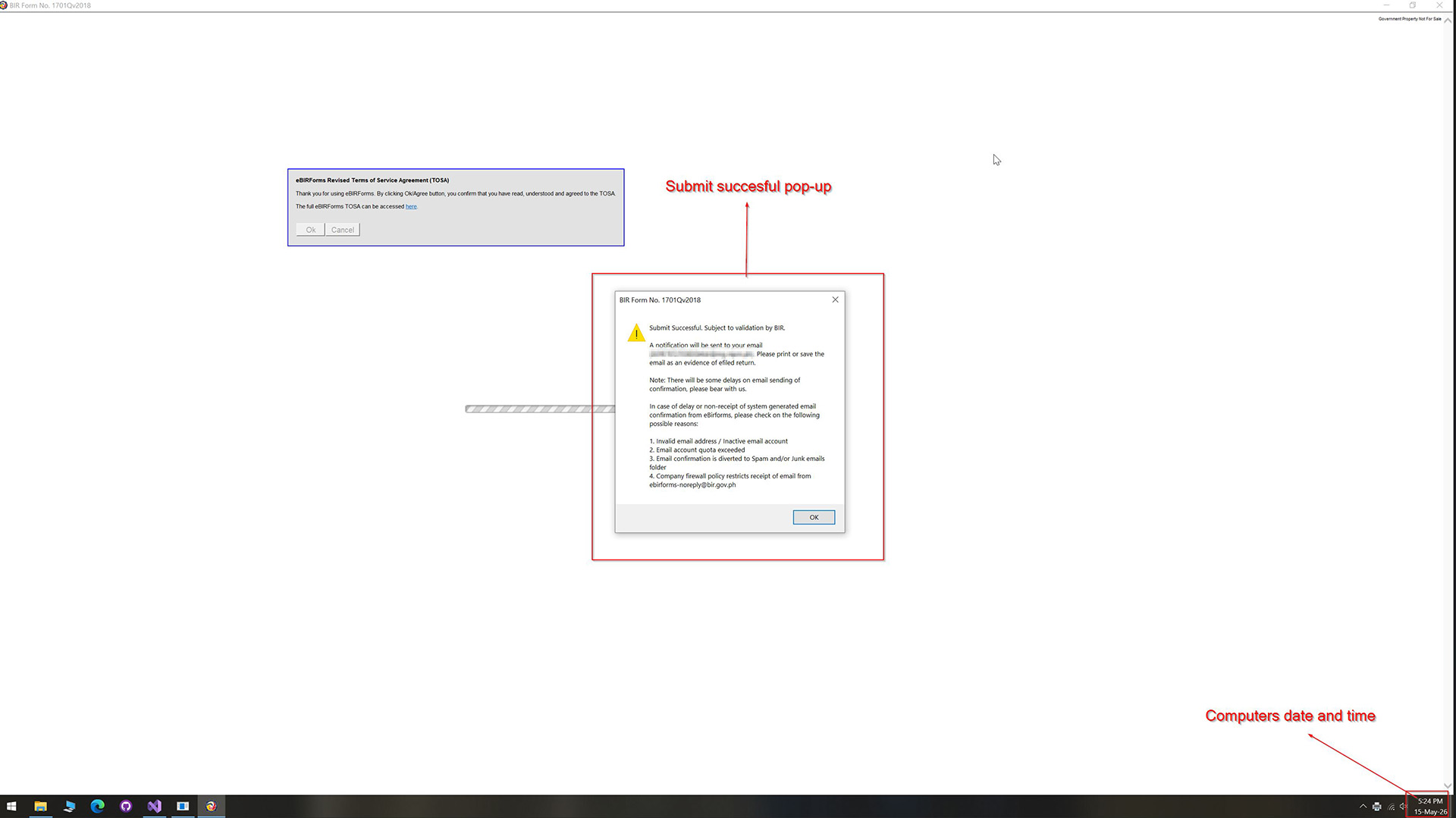
Doing so creates a more complete record of the filing. If questions later arise about whether the return was submitted before the filing deadline, the screenshot also shows when the confirmation appeared on your computer.
Although this is not specifically required by the BIR, capturing the full screen provides additional context and is a better recordkeeping practice than saving only the pop-up message.
How MPM Accounting Helps
To help businesses maintain complete tax filing records, MPM Accounting automatically captures a full-screen screenshot after a successful submission of supported BIR forms. The screenshot includes the filing confirmation together with the computer’s date and time, then saves it in the Files section of the corresponding tax return.
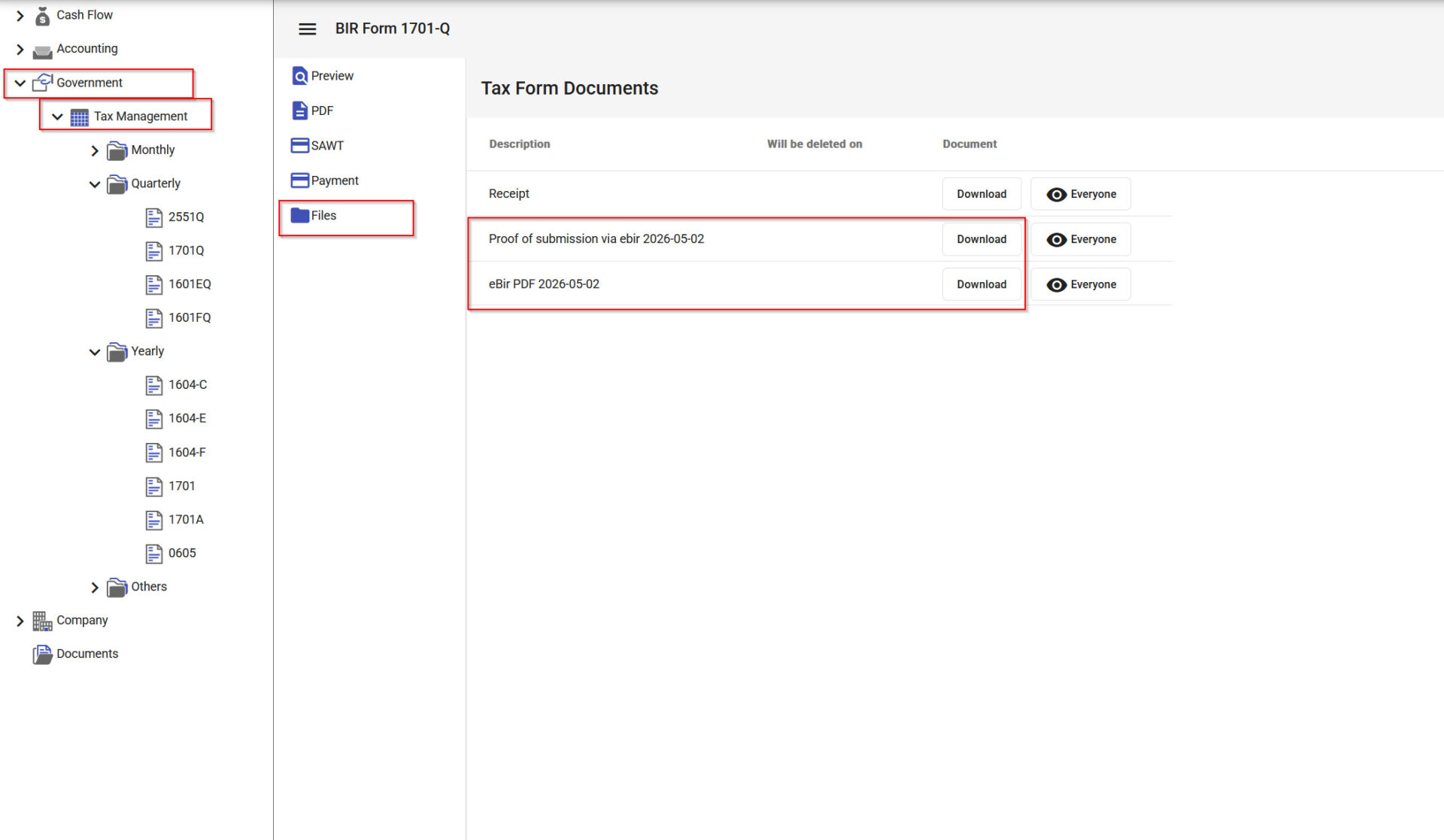
This helps businesses maintain a more complete filing record without relying on users to remember to manually take a screenshot after every submission.
This means you don’t have to remember to manually take a screenshot every time you file. If you need proof of filing later, the screenshot is already organized alongside the return, making it easier to retrieve during internal reviews, audits, or future reference.
Better Recordkeeping for Every Tax Filing
Receiving the TRRC is still ideal, but as recognized by the BIR, there may be times when the email is delayed.
By automatically preserving the filing confirmation screenshot together with your tax filing records, MPM Accounting helps you maintain organized documentation and makes it easier to keep the evidence of your electronic filing whenever you need it.

Leave a Reply